The Complete Audio to Text Guide: From Audio to Knowledge
If you work in the modern knowledge economy, you inevitably deal with audio. It might be a 90-minute stakeholder interview, a recorded Zoom product sync, a university lecture, or a rambling voice memo you captured on your commute.
As a medium for capturing human emotion, nuance, and inspiration, audio is unparalleled. But as a format for retrieving information, it is fundamentally inefficient.
Think about it. Audio is essentially a black box of data locked in linear time. You cannot skim a .wav file, and you cannot press Ctrl+F to locate a specific metric mentioned by the engineer. Until spoken words are converted into text, the insights inside remain difficult to search, organize, and reuse.
Why Audio to Text Matters
For decades, the only solution was manual brute force: wearing headphones, slowing playback, and typing until your wrists hurt. Today, automation has solved much of the speed problem. But turning a raw recording into a clean, usable document still requires more than uploading a file to a random website.
That is where reliable audio to text technology becomes essential. Done well, it does more than convert speech into words. It transforms recordings into searchable, manageable, and actionable knowledge. If you want to stop wasting hours on 1.5x playback and start building a truly searchable archive, this guide will show you how to do it right.
The Physics of Sound
The biggest misconception about modern speech-recognition engines is that they possess some sort of magic. They do not. They are statistical models trained on massive datasets. If a model cannot clearly isolate the human voice from the background noise, it will guess. And when neural networks guess, they hallucinate.
If you want highly accurate text, you must take responsibility for your acoustic environment. You do not need a $5,000 studio microphone, but you do need to respect the physics of sound.
1. The Inverse-Square Law is Your Friend
In acoustics, the closer the microphone is to the sound source (your mouth), the exponentially stronger the signal is compared to the background noise. A cheap \$15 lavalier microphone clipped to your shirt collar will consistently outperform a \$2,000 professional shotgun mic placed across a large, echoey room. Always close the physical distance.
2. Kill the Reverb
Speech models hate flat, hard surfaces. Empty conference rooms with glass walls are transcription nightmares because the sound bounces back into the microphone milliseconds after the original word is spoken, smearing the syllables together. If you are recording a solo voice note, do it in a room with rugs, curtains, or soft furniture to absorb the echo.
3. The Truth About Sample Rates
Many professionals mistakenly think they need 44.1kHz (CD quality) or 48kHz audio files for better text output. This is a myth. Human speech information is heavily concentrated between 300Hz and 8,000Hz. A 16kHz sample rate is exactly what most AI models downsample your audio to before processing. Uploading a massive lossless file doesn't improve accuracy; it just wastes your bandwidth.
Understanding ASR, Transformers, and WER
When choosing software to process your files, understanding the underlying mechanics is crucial. Early Automatic Speech Recognition (ASR) systems relied on phonetic matching, which failed miserably with accents, mumbling, or homophones (e.g., "there" vs. "their").
Modern AI transcription models (like OpenAI's Whisper architecture) use Transformers. They don't just "listen" to the sound; they predict the next word based on the context of the sentence. If the audio is muffled but the sentence structure implies the word "financial," the AI will correctly insert "financial" even if the audio sounded like "fin-an-shul."
However, you must manage your expectations using Word Error Rate (WER). A WER of 5% or lower is the gold standard for clean audio on top-tier tools. Never expect a 0% error rate in real-world environments. The goal is to get a 95% baseline that you can instantly utilize, not perfection.
Deconstructing the Workflow with Decopy
When you actually sit down to process a file, you need an engine that not only "hears" but also "extracts." Many professionals use basic tools that just dump a 15,000-word text block on their screen, leaving them overwhelmed.
This brings us to the ultimate modern workflow, embodied by a dedicated audio to text converter like Decopy. If you look at its interface, you'll realize it is engineered specifically to eliminate friction for knowledge workers.
1. Zero-Friction Input (Solving Format Chaos)
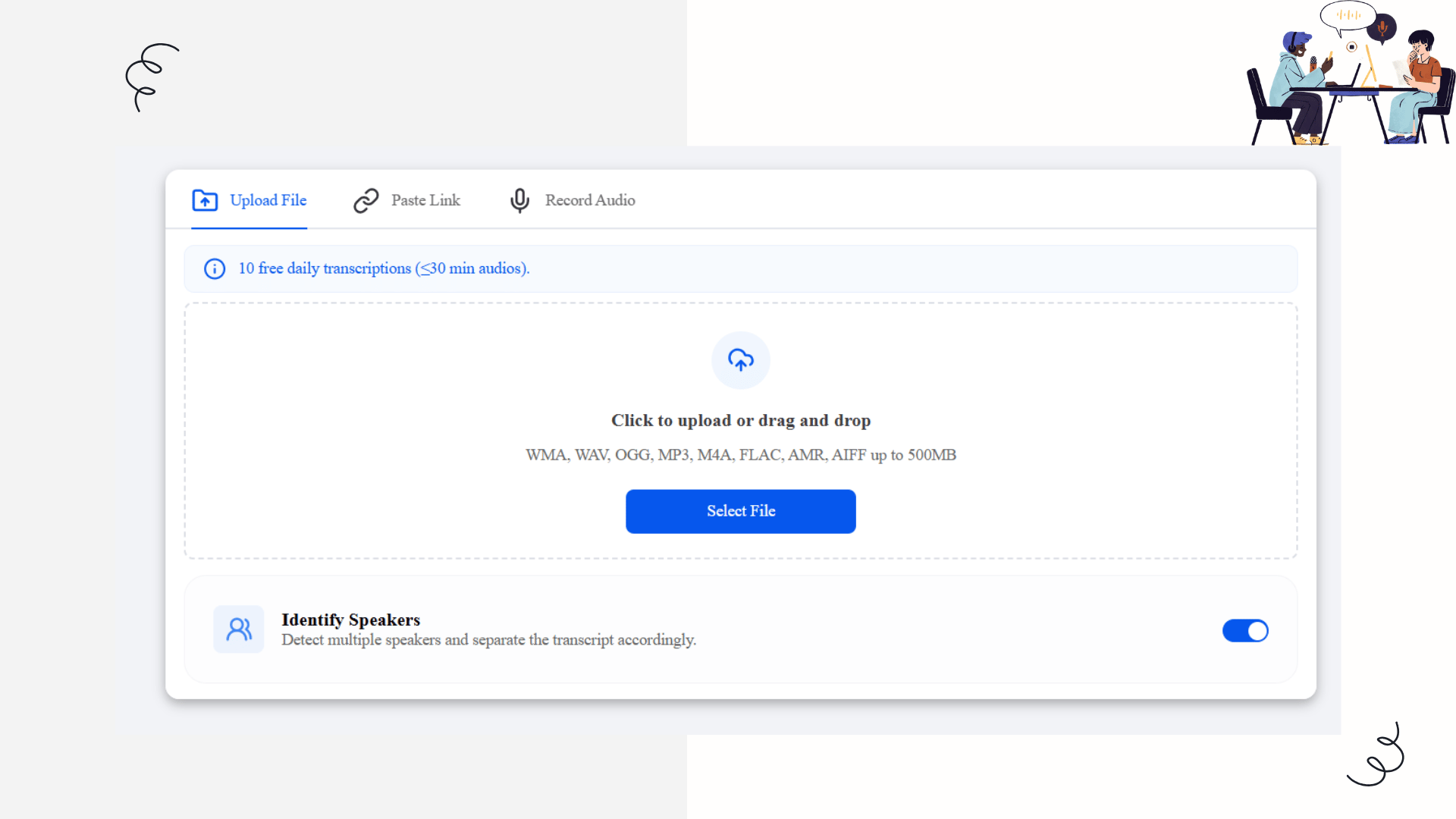
Decopy respects that data comes from everywhere. It offers three distinct input paths:
Heavy-Duty Uploads: You can drag and drop files up to 500MB. Whether it's a massive WAV from a professional recorder, a compressed OGG, or a standard MP3, the engine ingests it without complaining.
Paste Link (The Geek's Favorite): If you find an insightful audio file online, you don't need to download it to your hard drive. Just paste the URL directly into Decopy, and the servers handle the extraction.
In-Browser Recording: Skip the voice memo app entirely. Hit the mic icon, record your dictation directly in the browser, and move straight to processing.
2. Speaker Diarization: The Line Between Data and Noise
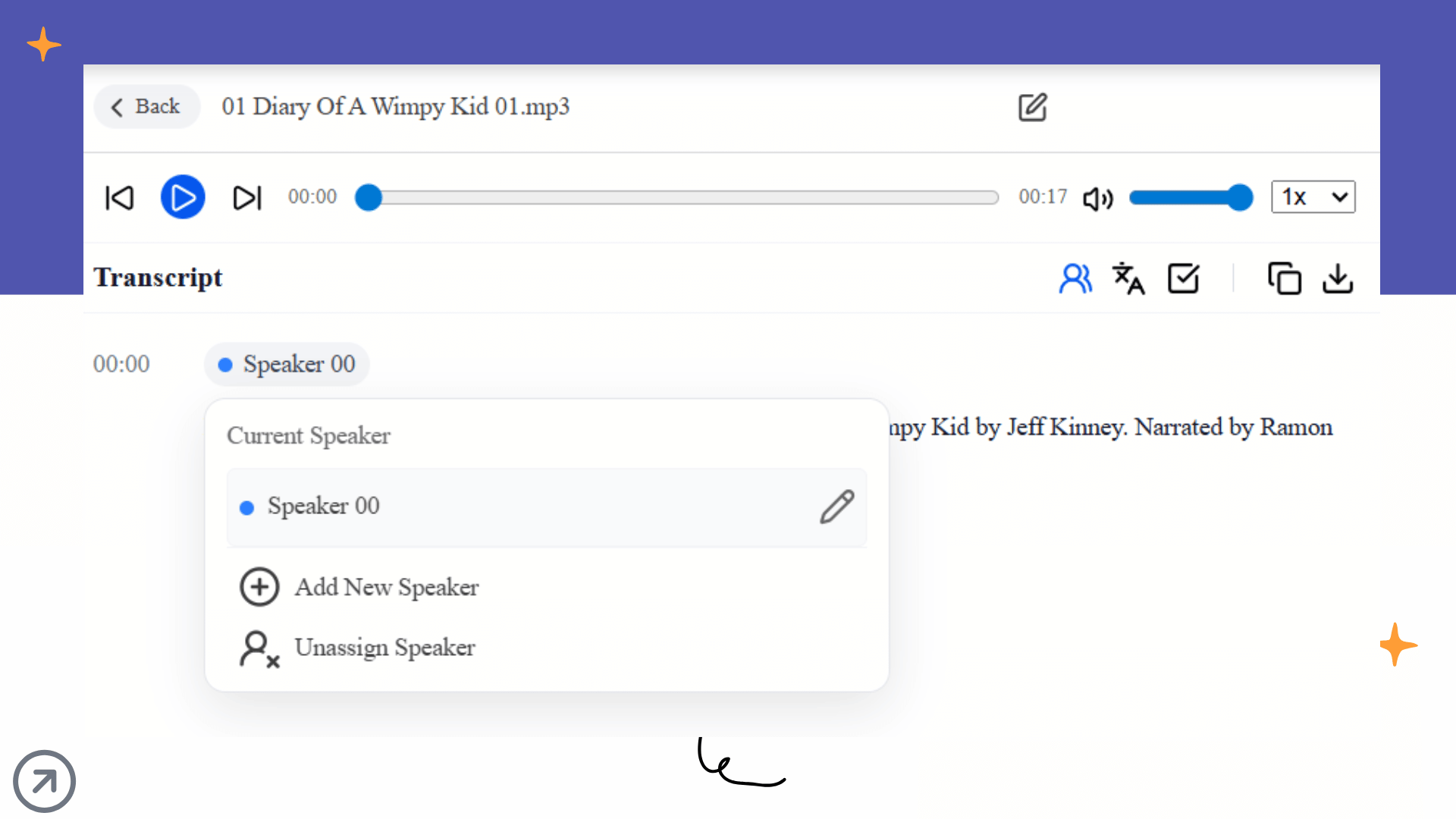
In a multi-person meeting, raw text without speaker labels is a nightmare. On Decopy's upload screen, there is a crucial toggle: Identify Speakers. By activating this, the model uses voice biometrics to split the transcript into Speaker 00, Speaker 01, etc. For roundtables or interviews, this is the baseline requirement for making a transcript readable.
From Raw Transcript to Knowledge Graph
When you successfully transcribe audio to text, you get a Verbatim Transcript: a wall of text filled with filler words, false starts, and run-on sentences.
The true killer feature of Decopy is that it embeds a Large Language Model (LLM) directly into your reading workspace.
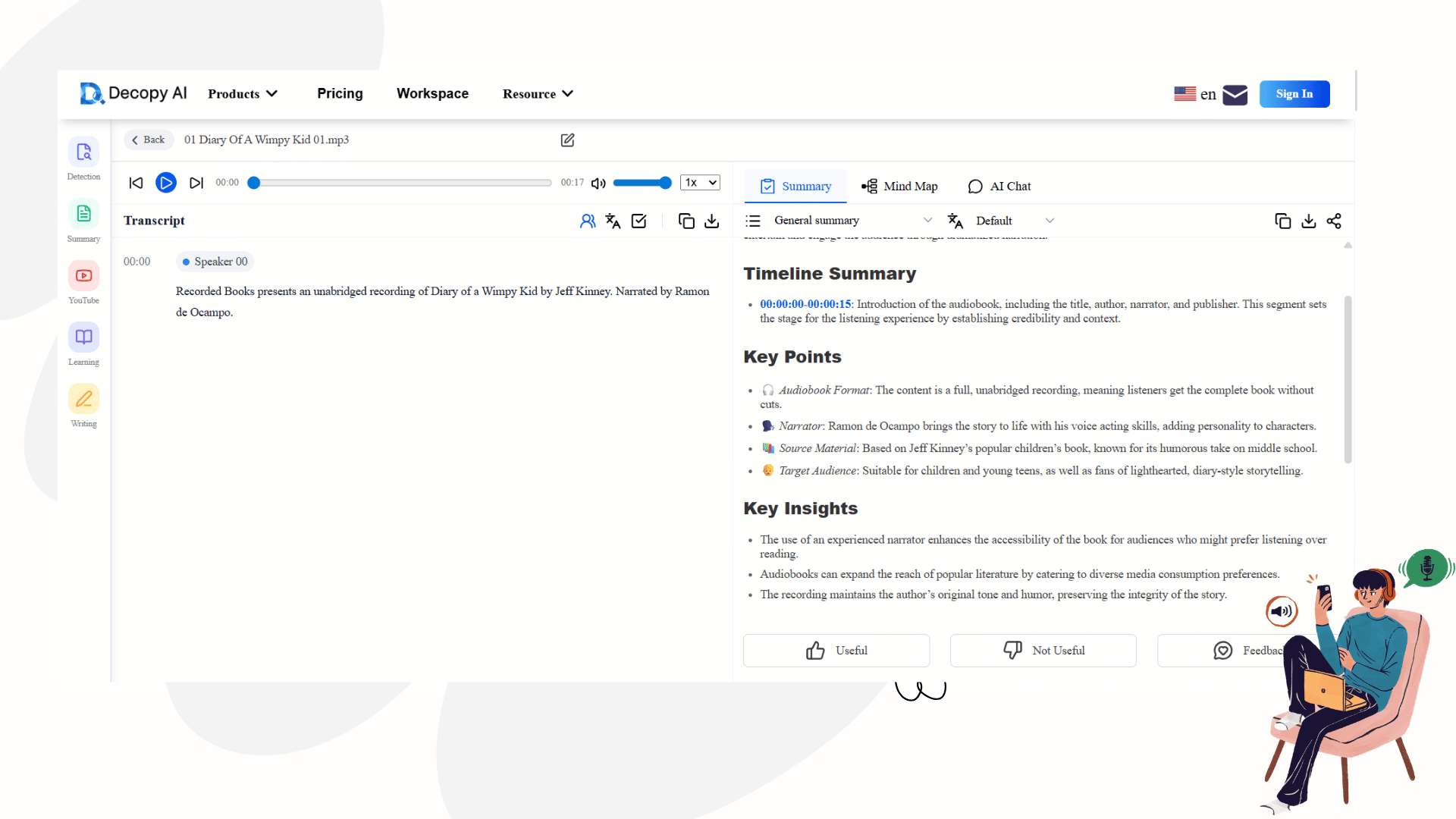
When you enter the result panel, you are presented with a highly efficient split-screen UI designed to reduce cognitive overload.
The Left Side (The Ground Truth): This is your raw transcript with precise timestamps and speaker tags. You can click on any sentence, and the audio will start playing from that exact millisecond. It captures nuances flawlessly, even in multiple languages like English or Japanese.
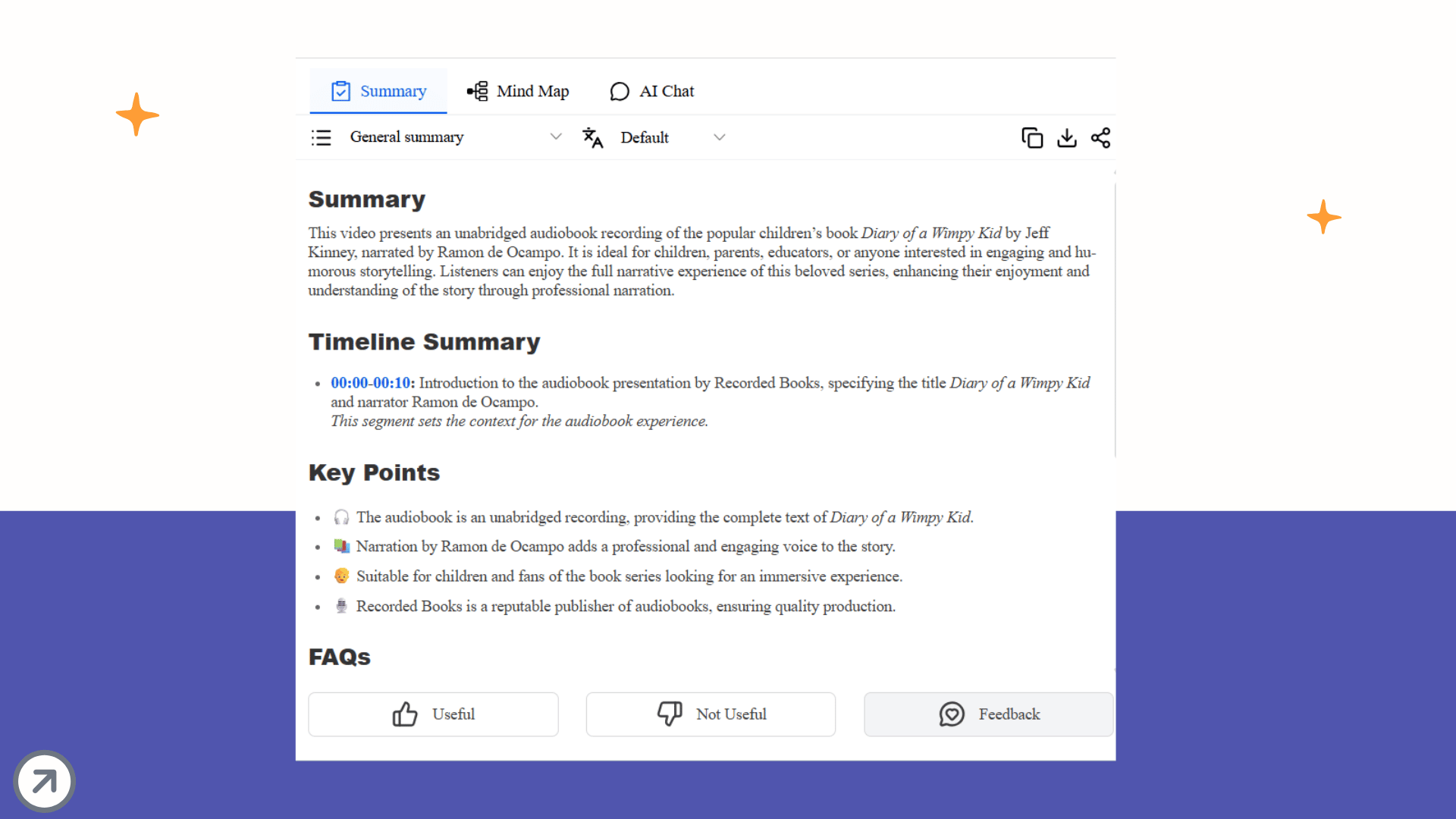
The Right Side (The Knowledge Engine): Instead of manually copying the text to ChatGPT, Decopy provides three built-in modules:
Summary: Instantly generates a structured "General Summary" with bullet points, logical deductions, and a final conclusion.
Mind Map: Turns a rambling 45-minute lecture into a visual tree of concepts, allowing you to grasp the entire logical skeleton in 10 seconds.
AI Chat (Chat with your Data): If you are looking for one specific detail (e.g., "What was the final budget approved for Q3?"), you simply ask the AI in the chat box. It will parse the local transcript and give you the exact answer.
Audio should not be the graveyard of your organization's ideas. By respecting the acoustics, utilizing advanced diarization, and leveraging built-in AI extraction tools like Decopy, you can compress an hour of talking into two minutes of actionable insight.
Stop rewinding. Start extracting.
Turn Audio into Knowledge
The true value of audio is not in simply storing it, but in making it usable. Once spoken content is transformed through speech to text into text that is searchable, extractable, and easy to revisit, it stops being a passive recording and becomes an active knowledge asset. Instead of letting important ideas disappear into a long timeline of playback, build a workflow that turns every meeting, interview, and voice note into information you can immediately use. Stop archiving audio as dead weight. Start converting it into knowledge that works for you.